Search engine optimization (SEO) is often associated with keywords, backlinks, and content creation. But behind every high-ranking website lies a powerful foundation that many overlook—technical SEO.
- Ensure crawlability and indexability: clear site architecture, XML sitemap, correct robots.txt, and fix broken links.
- Optimize performance and UX: improve page speed, Core Web Vitals, use CDN, compress assets, and ensure mobile-first responsive design.
- Maintain site integrity: use HTTPS, implement structured data, canonical tags, and proper redirects to prevent duplicate content and indexing issues.
Technical SEO ensures that search engines can effectively crawl, index, and understand your website. Without it, even the best content may never reach your audience.
What are some of the best technical SEO strategies that you employ for the best results?
— Lord Vincent Van Mendoza (@digitallourd) March 22, 2026
In this comprehensive guide, we’ll explore what technical SEO is, why it matters, and how you can optimize your website for better visibility, performance, and rankings.
What is Technical SEO?
Technical SEO refers to the process of optimizing your website’s infrastructure so that search engines can crawl, index, and render your pages efficiently.
According to SemRush, it is about improving your website to make it easier for search engines to find, understand, and store your content.
Unlike on-page SEO (which focuses on content) and off-page SEO (which focuses on backlinks), technical SEO deals with:
- Website architecture
- Page speed
- Mobile-friendliness
- Indexability
- Crawlability
- Structured data
- Security
In simple terms, technical SEO ensures your website is accessible, fast, and understandable for search engines like Google.
Why Technical SEO Matters
Search engines prioritize websites that provide a seamless user experience. If your site is slow, broken, or difficult to crawl, your rankings will suffer.
Here’s why technical SEO is critical:
1. Improves Crawlability
Search engines use bots (also called crawlers) to discover content. If your website structure is poor, important pages may never be found.
2. Enhances Indexing
Even if your pages are crawled, they must be properly indexed to appear in search results.
3. Boosts User Experience
Fast-loading, mobile-friendly websites lead to lower bounce rates and higher engagement.
4. Supports Higher Rankings
Google uses technical factors such as Core Web Vitals and HTTPS as ranking signals.
5. Prevents SEO Issues
Technical errors like broken links, duplicate content, and redirect loops can harm your visibility.
How Search Engines Work
Before diving deeper, it’s important to understand how search engines function. There are three main stages:
1. Crawling
Search engine bots scan the web to find new and updated pages.
2. Indexing
The discovered pages are analyzed and stored in a database.
3. Ranking
Pages are ranked based on relevance, quality, and hundreds of ranking factors.
Technical SEO ensures your website performs well at each of these stages.
Core Elements of Technical SEO
1. Website Crawlability
Crawlability determines whether search engines can access your content.
Best Practices:
- Use a clear and logical site structure.
- Ensure important pages are not blocked in robots.txt.
- Create and submit an XML sitemap.
- Fix broken internal links.
A well-structured website helps search engines understand your content hierarchy.
2. XML Sitemap
An XML sitemap is a file that lists all important pages on your website.
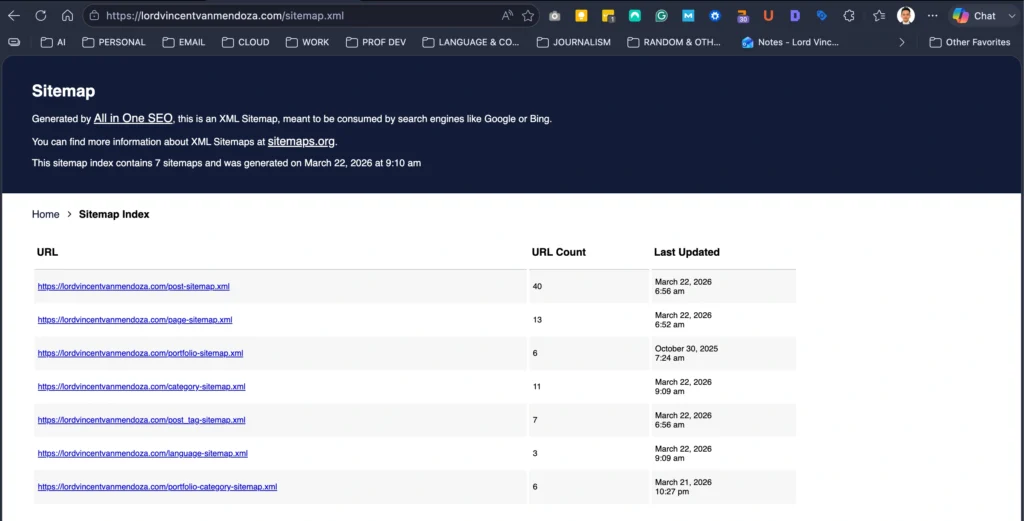
Why it matters:
- Helps search engines discover new content
- Improves indexing efficiency
Tips:
- Include only important pages
- Keep it updated automatically
- Submit it via Google Search Console
3. Robots.txt File
The robots.txt file tells search engines which pages they can or cannot crawl.
Have a loot at mine:
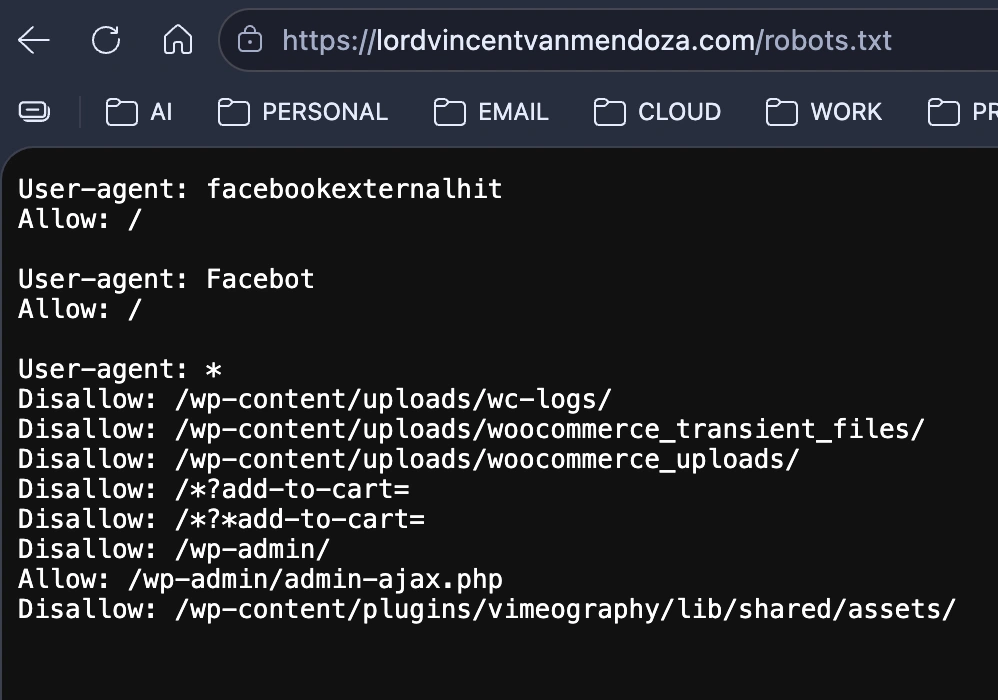
Example:
User-agent: *
Disallow: /admin/
Best Practices:
- Avoid blocking important pages
- Use it carefully to prevent indexing issues
4. Site Architecture
Your website structure should be simple and easy to navigate.
Ideal Structure:
- Homepage → Categories → Subcategories → Pages
Tips:
- Keep pages within 3 clicks from the homepage
- Use internal linking strategically
- Avoid orphan pages
5. URL Structure
Clean and descriptive URLs improve both SEO and user experience.
Good Example:
yourwebsite.com/technical-seo-guide
Bad Example:
yourwebsite.com/page?id=12345
Best Practices:
- Use hyphens instead of underscores
- Keep URLs short and descriptive
- Avoid unnecessary parameters
6. Page Speed Optimization
Page speed is a crucial ranking factor.
Why it matters:
- Faster websites improve user experience
- Reduces bounce rate
- Increases conversions
Optimization Tips:
- Compress images
- Use a Content Delivery Network (CDN)
- Minimize CSS and JavaScript
- Enable browser caching
7. Core Web Vitals
Core Web Vitals measure real-world user experience.
The way to check this is by using Google’s PageSpeed Insights.
Key Metrics:
- Largest Contentful Paint (LCP) – Loading performance
- First Input Delay (FID) – Interactivity
- Cumulative Layout Shift (CLS) – Visual stability
Improving these metrics can significantly boost your rankings.
8. Mobile-Friendliness
With mobile-first indexing, Google primarily uses the mobile version of your site for ranking.
Best Practices:
- Use responsive design
- Ensure fast loading on mobile devices
- Avoid intrusive pop-ups
9. HTTPS and Website Security
Security is a ranking factor.
Why HTTPS matters:
- Protects user data
- Builds trust
- Improves rankings
Always install an SSL certificate and ensure your site runs on HTTPS.

10. Structured Data (Schema Markup)
Structured data helps search engines understand your content better.
Benefits:
- Enables rich results (stars, FAQs, reviews)
- Improves click-through rates
Common Types:
- FAQ schema
- Article schema
- Product schema
11. Canonical Tags
Canonical tags prevent duplicate content issues.
Example:
<link rel="canonical" href="https://example.com/page" />
Use Cases:
- Similar pages with slight variations
- E-commerce product filters
12. Duplicate Content Management
Duplicate content can confuse search engines and dilute rankings.
Fixes:
- Use canonical tags
- Implement 301 redirects
- Avoid copying content across pages
13. Use Redirects
Redirects guide users and search engines from one URL to another.
Types:
- 301 Redirect (permanent)
- 302 Redirect (temporary)
Best Practices:
- Use 301 redirects for permanent changes
- Avoid redirect chains
- Fix broken links
14. Crawl Budget Optimization
Crawl budget refers to how many pages search engines crawl on your site.
Tips:
- Remove low-value pages
- Fix duplicate content
- Optimize internal linking
15. JavaScript SEO
Modern websites rely heavily on JavaScript, but it can cause indexing issues.
Best Practices:
- Ensure content is accessible without JavaScript
- Use server-side rendering (SSR) if possible
- Test pages in Google Search Console
Common Technical SEO Issues
Here are some frequent problems that can affect your website:
- Broken links (404 errors)
- Slow page loading speed
- Missing meta tags
- Duplicate content
- Incorrect redirects
- Blocked pages in robots.txt
- Poor mobile usability
Regular audits can help identify and fix these issues.
Technical SEO Audit Checklist
Use this checklist to evaluate your website:
Crawlability
- XML sitemap submitted
- robots.txt configured correctly
Indexing
- No “noindex” on important pages
- Pages indexed in Google
Performance
- Fast loading speed
- Optimized Core Web Vitals
Structure
- Clean URL structure
- Logical site architecture
Security
- HTTPS enabled
Mobile
- Fully responsive design
Errors
- No broken links
- No duplicate content
Tools for Technical SEO
To optimize your website effectively, use these tools:
- Google Search Console
- Google PageSpeed Insights
- Screaming Frog SEO Spider
- Ahrefs Site Audit
- SEMrush Site Audit

These tools help identify issues and provide actionable insights.
Best Practices for Technical SEO
To stay ahead in search rankings, follow these best practices:
- Regularly audit your website
- Keep your sitemap updated
- Monitor Core Web Vitals
- Fix errors promptly
- Optimize for mobile-first indexing
- Use structured data
- Maintain a clean site architecture
Consistency is key in technical SEO.
The Future of Technical SEO
Technical SEO continues to evolve as search engines become more sophisticated.
Emerging Trends:
- AI-driven search algorithms
- Voice search optimization
- Increased importance of UX signals
- Faster web technologies (e.g., HTTP/3)
Staying updated with these trends ensures long-term success.
Technical SEO is the backbone of a successful website. Without a strong technical foundation, even the best content and backlink strategies may fail.
By optimizing your website’s crawlability, speed, structure, and security, you create an environment where search engines can easily access and rank your content.
Whether you’re a beginner or an experienced SEO specialist, investing in technical SEO is essential for sustainable growth and higher rankings.
Frequently Asked Questions About Technical SEO
Summarize with AI




Interested
Hello, Shalem! Drop me a message if you’re willing to connect, and let’s optimize your site!
[…] SEO refers to the process of optimizing your website’s infrastructure so that search engines can crawl, index, and render your pages […]