
How to Optimize Your Google Business Profile for Local SEO (2026 Guide)
Last Updated on July 5, 2026 by Lord Vincent Van Mendoza
- Keep business information complete and accurate: name, category, description, hours, and service area.
- Select one precise primary category and relevant secondary categories that match actual services.
- Manage reviews: encourage feedback, respond to all reviews promptly, and use QR codes to collect more.
- Keep profile active: post weekly updates, add high-quality photos and videos, enable messaging and online bookings.
If you want more local customers, your Google Business Profile (GBP) is one of the most powerful (and free) tools you can use. A fully optimized profile helps your business appear in Google Search and Maps, increases trust, and drives more calls, bookings, and visits.
In fact, businesses with complete profiles can get 7x more clicks and 5x more views.
This guide breaks down the most important steps to fully optimize your GBP for local SEO success.
These are some of the strategies that Google presented in their “How business can make the most of Google“.
Why Google Business Profile Matters for SEO
Your GBP acts as your digital storefront. When optimized correctly, it helps you:
- Rank higher in local search results
- Increase customer engagement
- Build trust through reviews and content
- Drive conversions (calls, bookings, visits)
A well-maintained profile can directly impact buying decisions—29% of users are more likely to choose businesses with detailed profiles.
1. Keep Your Business Information Accurate
Your foundation starts with complete and accurate details:
- Business name
- Category
- Description
- Operating hours
Consistency builds trust and improves visibility. Even small inaccuracies can hurt your rankings.
2. Choose the Right Business Categories
Your primary category tells Google what your business is about, while secondary categories expand your reach.
- Use 1 primary category
- Add up to 9 secondary categories
- Choose categories based on actual services
This helps you appear in more relevant searches.
Example:
“Professional electrician in Rhodes offering residential and commercial electrical services.”
4. Set and Update Business Hours
Accurate hours are critical:
- Include regular hours
- Add holiday or special hours
- Update changes immediately
96% of customers are more likely to visit businesses with listed hours.
5. Define Your Service Area
If you serve specific locations:
- Add up to 20 service areas
- Keep coverage realistic (within ~2 hours distance)
- Be specific with cities or regions
This improves your local search targeting.
6. Add Business Attributes
Attributes highlight features like:
- Free Wi-Fi
- Wheelchair accessibility
- Pet-friendly options
These improve discoverability and help customers quickly decide.
7. List Your Services (With Descriptions)
A complete service list helps customers understand your offerings.
Best practices:
- Add all services
- Include descriptions
- Organize into categories
- Add pricing where possible
This builds trust and increases conversions.
8. Upload High-Quality Photos & Videos
Visual content is a major ranking and conversion factor.
Businesses with photos get:
- 42% more direction requests
- 35% more website clicks
Upload:
- Storefront photos
- Team photos
- Before/after work
- Product or service images
9. Post Regular Updates (Google Posts)
Google Posts keep your profile active and engaging.
Post:
- Offers
- Events
- Updates
Tips:
- Include keywords
- Add images
- Post weekly
This boosts visibility and engagement.
10. Add Social Media Links
Link platforms like:
- YouTube
This strengthens your online presence and increases cross-platform traffic.
11. Enable Messaging (WhatsApp & SMS)
Customers prefer fast communication:
- 67% prefer messaging over calls or email
Adding chat options makes it easier for leads to reach you instantly.
12. Accept Bookings & Appointments
Make it easy to convert leads:
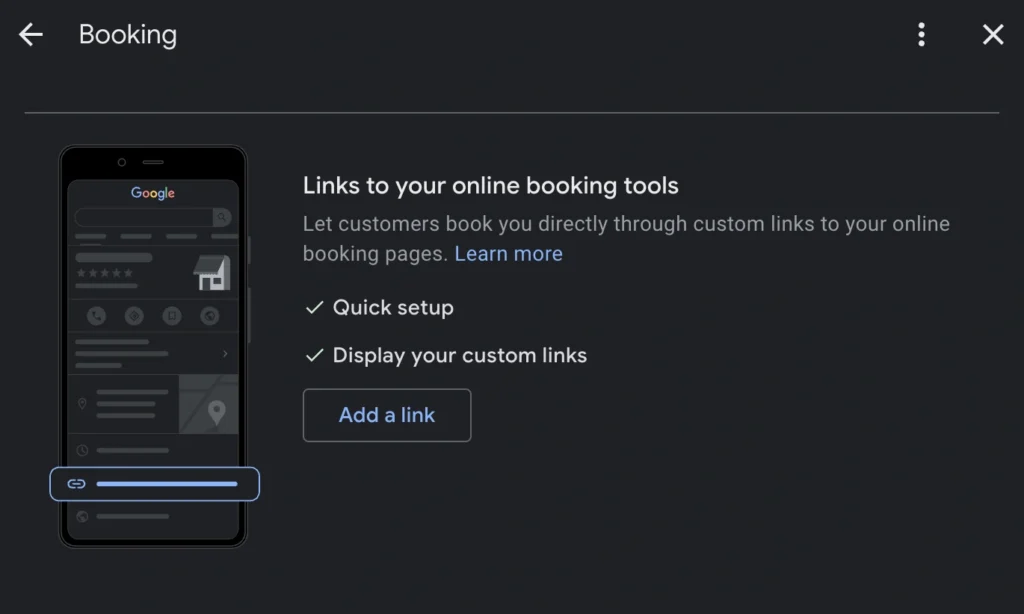
- Add booking links
- Use “Book Online” integrations
- Ensure a smooth user experience
77% of customers expect online booking options.
13. Manage and Respond to Reviews
Reviews are one of the strongest ranking factors.
- Respond to all reviews (positive & negative)
- Encourage satisfied customers to leave feedback
- Use QR codes to collect reviews
91% of consumers rely on reviews before choosing a business.
14. Verify and Secure Your Profile
Verification is required to:
- Edit your business details
- Respond to reviews
- Manage visibility
It may take up to 5 business days to complete.
15. Assign Multiple Managers
Avoid losing access:
- Add multiple managers
- Keep ownership updated
- Remove inactive users
This ensures continuous control of your profile.
Your Google Business Profile isn’t only a “set and forget” tool. It is also an active marketing channel.
Want the best tool for local SEO? I highly recommend using SemRush as it has the tool you need to succeed in local search optimization.
To stay competitive:
- Keep information updated
- Post regularly
- Engage with customers
- Monitor performance
When done right, your GBP can become your #1 source of local leads and conversions.
Frequently Asked Questions
What is Google Business Profile optimization?
Google Business Profile optimization is the process of improving your listing to increase visibility in local search and Google Maps by updating information, adding content, and managing reviews.
Why is Google Business Profile important for local SEO?
It helps your business appear in local searches, improves trust, and drives conversions such as calls, bookings, and visits.
How can I rank higher on Google Maps?
Complete your profile, use correct categories, get reviews, post regularly, and maintain accurate business details.
How often should I update my Google Business Profile?
At least once a week through posts, photos, or review responses to keep your profile active.
Do photos help improve local SEO?
Yes, photos increase engagement, clicks, and conversions, improving overall performance in local search.
How important are reviews?
Reviews build trust and influence rankings. Responding to them improves credibility and engagement.
What should I include in my business description?
Include your services, keywords, and unique value while keeping it clear and concise.
Can I add multiple service areas?
Yes, adding multiple service areas helps you appear in more local searches.
How do Google Posts help?
They keep your profile active, improve engagement, and attract customers with fresh content.
Is Google Business Profile free?
Yes, it’s completely free and one of the most powerful local SEO tools available.

Vince is a digital marketing specialist, event host, and content creator based in Davao City, Philippines. Known for blending creativity, communication, and strategy, he helps brands and organizations strengthen their digital presence through compelling content and smart marketing practices. He specializes in SEO, content creation, social media management, pay-per-click advertising, and email marketing—turning ideas into content that builds visibility and helps businesses grow online. Outside of work, he loves to watch Netflix on weekends.