
Areas We Check When Doing Site Audit for SEO
Introduction
Purpose of an SEO site audit
In my 6 years of doing Search Engine Optimization (SEO), there's but one thing that we cannot do away with, and that's doing an SEO audit. No wonder most SEO experts would use it as a lead magnet that they would offer a "FREE SITE AUDIT" to hook site visitors.This is ubiquitous in all SEO trades. But what is it? What areas do we look into in such an audit?An SEO site audit assesses how your site performs in search engines and why it may not rank as well as it could. It identifies technical health issues, content gaps, and opportunities to improve crawlability and user experience. The aim is to uncover actionable fixes that drive organic traffic and conversions.
- Robots.txt, meta robots, XML sitemaps, and crawl errors; fix blocks, broken responses, and redirect issues to ensure pages are discoverable.
- Logical site architecture, clean URLs, HTTPS correctness, and canonicalization to prevent duplicates and preserve link signals.
- Improve Core Web Vitals and load speed: optimize LCP, interaction readiness, and layout stability via caching, CDNs, and script management.
- Unique titles, meta descriptions, clear header structure, and deep, intent-focused content with optimized images and alt text.
- Strategic internal links, shallow navigation, fix orphan pages, and breadcrumbs to distribute authority and improve discovery.
Overview of checked areas
We review a comprehensive set of areas that influence rankings and visibility. This includes crawlability, technical foundations, page speed, on-page optimization, internal linking, accessibility, security, and off-site signals. Each area yields insights to prioritize improvements.
How this audit supports your digital marketing goals
By aligning findings with your objectives, the audit helps you boost SERP presence, increase qualified traffic, and improve site outcomes. The process informs content strategy, technical fixes, and UX enhancements that enhance credibility with clients and search engines alike.
1. Crawlability and Indexing Health
Robots.txt and meta robots directives
Your robots.txt file guides search engines on what to crawl. Review for unintended blocks that hide important pages. Check meta robots directives on individual pages to ensure they align with your indexing goals.
Here's an example from my site: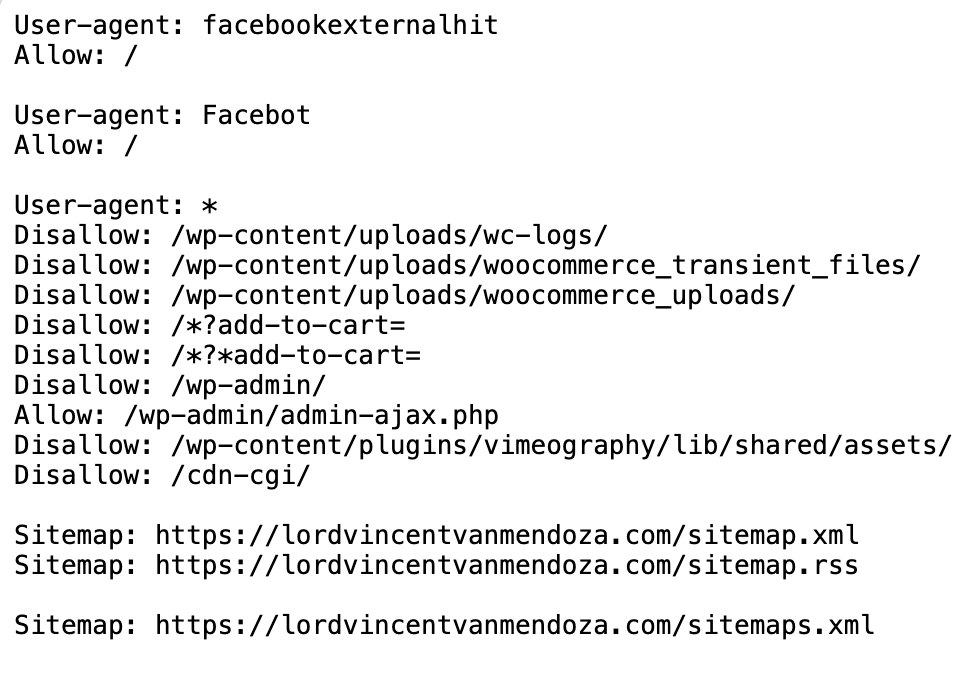
- Ensure the blog and key archives are crawlable if you want them indexed.
- Avoid conflicting tags that block indexing while you intend to publish.
- Test changes with a robots.txt tester and monitor results in search Console.
XML sitemap integrity and submission
An accurate sitemap helps search engines discover your pages efficiently. Verify the sitemap exists, lists the correct URLs, and is referenced in robots.txt where applicable.
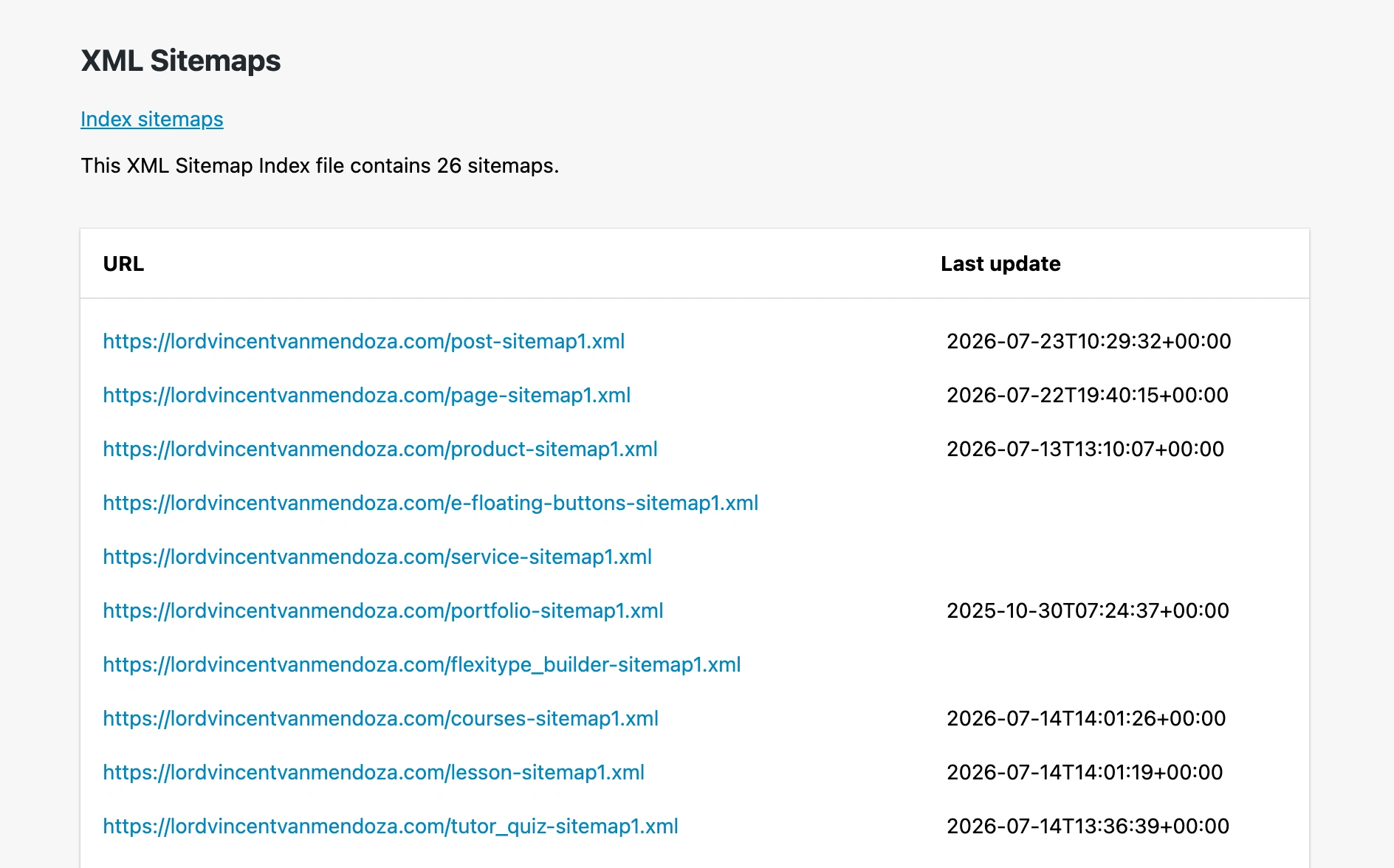
- Regularly audit for broken or removed pages in the sitemap.
- Submit updated sitemaps to your search engine console periodically.
- Ensure priority and update frequency reflect content changes without overclaiming relevance.
Crawl errors and server responses
Crawl errors signal accessibility issues that prevent indexing. Review server responses to identify and fix 4xx and 5xx errors, redirects, and latency spikes.
| Area | What to check | Impact |
|---|---|---|
| Blocked resources | Images, scripts, or CSS essential for rendering | Can hinder indexing and visual assessments |
| Redirects | Chains or loops that delay access | May dilute link equity and slow crawling |
| Server responses | Status codes and response times | Affects crawl budget and user experience |
2. Technical SEO Fundamentals
Site architecture and URL structure
A clean site architecture helps search engines discover and understand content. A logical hierarchy supports intuitive navigation and efficient crawling. Aim for a shallow depth where important pages are reachable within a few clicks.
- Ensure consistent URL patterns that reflect hierarchy and content type.
- Avoid overly long or dynamic URLs with unnecessary parameters.
- Use descriptive, keyword-relevant segments without stuffing.
Practical example: imagine a blog with categories like /guides/ and /reviews/. A post about image optimization would live at /guides/image-optimization-tips, not buried in a random slug.
Actionable steps: map your top pages and create a breadcrumb-friendly structure. Regularly audit with a sitemap and fix orphaned or unreachable pages. For lordvincentvanmendoza.com, align post slugs with focused topics you routinely cover to reinforce topic authority.
HTTPS security and certificate status
Security signals impact trust and rankings. A valid HTTPS setup protects data and is favored by users and engines. Regular checks prevent mixed content that can undermine safety signals.
- Verify the certificate is current and correctly installed for all domains and subdomains.
- Monitor for mixed content warnings on pages frequently crawled by search engines.
- Ensure redirects from HTTP to HTTPS are seamless and preserve link equity.
a site-wide mixed content issue can trigger browser warnings and reduce crawl depth efficiency. Set up automatic renewal alerts with your certificate authority and test critical pages after renewal.
Steps to implement: enable HSTS where appropriate, verify all internal links use HTTPS, and run quarterly scans using a tool like your hosting dashboard or an SEO platform to catch leaks early.
Canonicalization and duplicate content signals
Canonical signals help search engines identify the preferred version of a page. Proper canonicalization reduces content duplication and consolidates signals.
| Issue | Impact | Remediation |
|---|---|---|
| WWW vs non-WWW | Potential split signals | Choose a primary variant and implement 301 redirects |
| Trailing slash handling | Duplicate pages across variants | Standardize with consistent redirects or canonical tags |
| Parameterized URLs | Indexing inefficiency | Use canonical tags or param handling in Search Console |
Expert note: avoid duplicating product or article pages across multiple category paths. Pick one canonical URL per item and consistently reference that URL in internal links and sitemaps.
if two pages offer distinct value, use rel canonical only when you truly consolidate signals. For seasonal content, consider temporary canonical variations to preserve relevance without cluttering index.
3. Core Web Vitals and Page Speed
This is an example of a PageSpeed Insights result for my Digital Lourd website: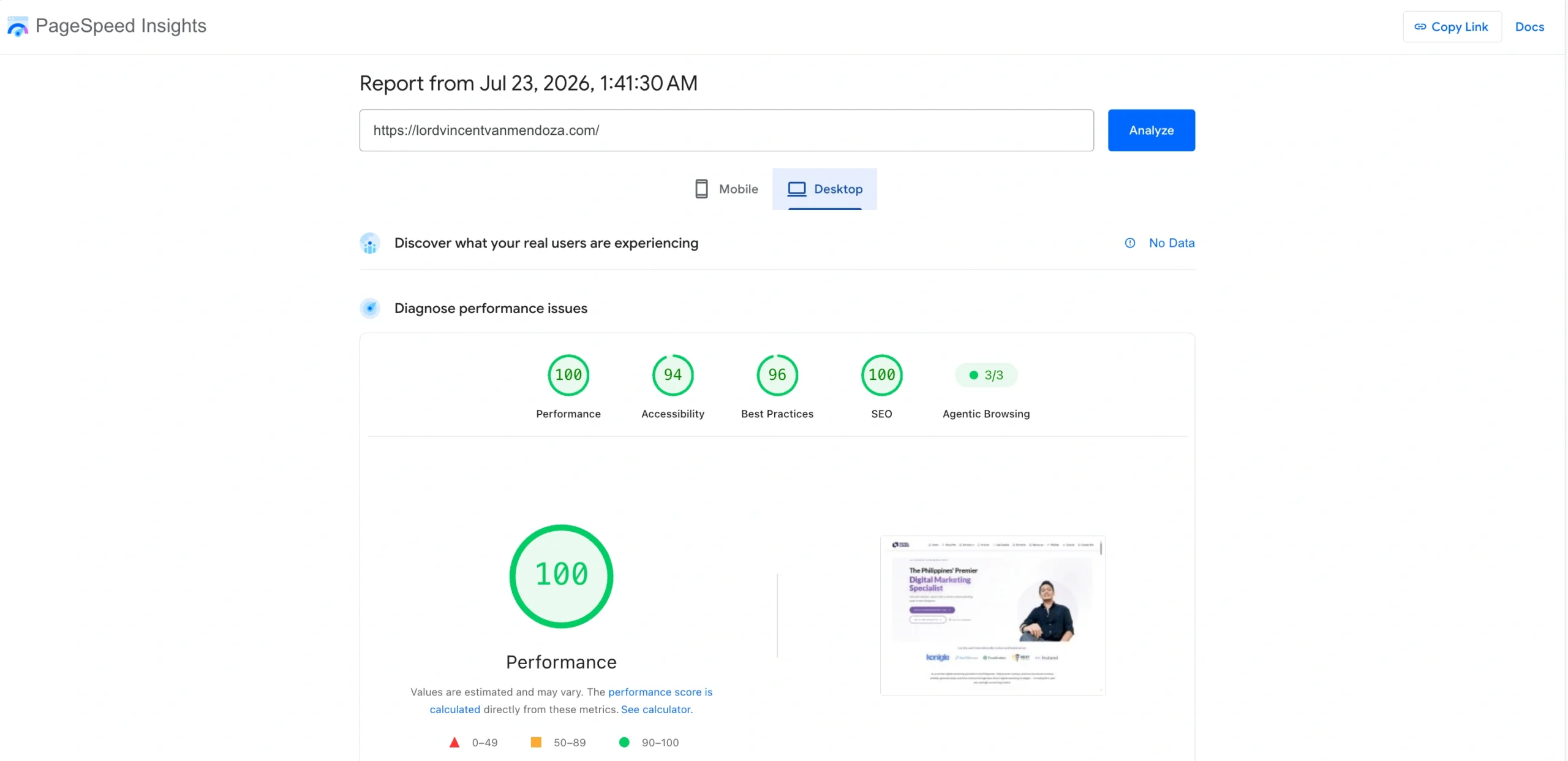
Largest Contentful Paint (LCP) optimization
LCP indicates when the main content becomes visible to users. A fast LCP reflects a responsive page and a positive experience. Aim to deliver the primary content promptly, reducing perceived wait times.
- Improve server response times to enhance initial render. Consider HTTP/2, caching, and a CDN for static assets.
- Prioritize above-the-fold content and defer offscreen assets. Preload critical fonts and images, then lazy load below-the-fold elements.
- Compress and size images appropriately. Use next-gen formats like WebP or AVIF and set responsive sizes with srcset.
First Input Delay (FID) and interaction readiness
FID measures how quickly the page responds to user actions. A low FID makes interactions feel immediate. Reduce main-thread work and streamline scripts.
- Break long tasks into smaller asynchronous chunks. Defer nonessential code until after the first interaction.
- Limit or defer nonessential third-party scripts during load. Load them only when necessary.
- Utilize passive event listeners for touch and scroll interactions to improve responsiveness.
Cumulative Layout Shift (CLS) stability and tooling
CLS tracks visual stability during load. A stable layout prevents unexpected clicks and improves readability. Identify and minimize unexpected shifts.
- Allocate space for ad slots and embeds with explicit dimensions or CSS aspect ratios.
- Avoid inserting content above existing content during load. Use placeholders or defer additions.
- Stabilize font loading to prevent jumps. Prefer font-display: swap and preload critical fonts with consistent metrics.
4. On-Page SEO and Content Quality
Title tags, meta descriptions, and header structure
Title tags and meta descriptions serve as the first impression in search results. They should accurately reflect the page content and avoid keyword stuffing. A logical header structure helps search engines and users follow the content flow. Apply these practices at lordvincentvanmendoza.com to convey clear value from the start.
- Craft unique titles for each page that naturally incorporate target terms.
- Write concise meta descriptions that invite clicks while summarizing value.
- Use a coherent header order (H1 followed by H2, H3, and so on) to mirror content structure.
Content relevance, depth, and keyword alignment
Content should address user intent with depth and clarity. Align topics to user questions to boost engagement and rankings. Avoid thin content and ensure coverage matches search expectations. Real-world example: a service page should outline steps, timelines, and outcomes a client can anticipate.
- Integrate primary keywords naturally within the context, avoiding force placements.
- Expand topics with supporting details, examples, and evidence.
- Regularly refresh pages to reflect current information and trends.
Image optimization and alt text usage
Images enhance context and can improve search visibility. Proper optimization supports accessibility and page performance. Alt text describes visuals for crawlers and users who disable images. Use concrete checks during audits to ensure consistency.
- Compress images to balance quality and speed.
- Use descriptive file names and alt attributes that reflect content.
- Leverage image sitemaps when relevant to indexing.
5. Internal Linking and Site Navigation
Internal link architecture and anchor text strategy
Internal links help crawlers and users discover related content while distributing authority across the site. A thoughtful structure clarifies topic relationships and page importance.
Aim for logical depth and clear pathways from high authority pages to deeper assets. Use anchor text that describes the destination page intent without keyword stuffing.
- Maintain a shallow structure where important pages are reachable within 3 clicks from the homepage.
- Anchor text should be varied yet descriptive, reflecting user intent.
- Avoid overlinking on a single page; spread links to diversify signal flow.
Real-world tip: map your site like a family tree. Tag categories as roots, hub pages as trunks, and article pages as branches to keep navigation intuitive for both users and Google.
How to implement quickly: audit the top 20 pages with high impressions, add 2, 3 links per page to related topics, and refresh anchor text to match current user intents observed in search queries.
Note on metrics: monitor crawl depth in your CMS logs and adjust as needed to avoid unnecessary hops.
Orphan pages and crawl depth adjustments
Orphan pages lack internal links from other pages, hindering crawl and indexability. Identify these pages and integrate them into relevant sections or hub pages.
Review crawl depth to ensure critical assets are not buried too deep. Adjust navigation to reduce unnecessary hops for both users and bots.
- Audit for pages without inbound internal links and create contextual connections.
- Balance depth so important content sits within a few layers of the homepage.
- Use hub-and-spoke models to group related topics under central category pages.
Practical example: if a product guide sits on a standalone URL, link it from related category pages and a sitemap entry to ensure discovery during site reviews.
Action steps: run a quarterly crawl, identify pages with zero internal links, and assign them to at least two contextually related pages with clear anchor text.
Brand note: lordvincentvanmendoza.com emphasizes practical site structure as a foundation for faster indexing and better user journeys.
Breadcrumbs and user experience implications
Breadcrumbs clarify site hierarchy and assist backtracking. They also provide additional internal link paths for crawlers.
Design breadcrumbs to reflect current page taxonomy and improve click-through opportunities from deeper sections.
- Place breadcrumbs near the top of content to aid scanning without clutter.
- Ensure breadcrumb links are accessible and consistently styled across pages.
- Validate that breadcrumb trails align with the site’s category structure and navigation.
Real-world tweak: use breadcrumbs to show category progress when users drill into a guide, helping them back out without losing context.
Implementation tips: test with users, ensure screen reader compatibility, and keep path length to 3, 4 segments for readability.
6. Technical Accessibility and Security
Mobile usability and responsive design
Mobile usability directly affects user experience and rankings. Assess tap targets, viewport configuration, and content reflow across devices.
- Check for readable font sizes and touch-friendly controls.
- Ensure layout adapts to various screen widths without horizontal scrolling.
- Test across popular devices and emulation modes to confirm consistency.
HTTPS implementation and mixed content checks
Secure connections protect data integrity and user trust. Verify a current TLS certificate and strict secure practices.
- Confirm all pages load via HTTPS with no mixed content warnings.
- Review certificate validity, chain trust, and renewal dates.
- Minimize insecure assets that could undermine security perception.
Structured data and schema adoption readiness
Structured data helps search engines interpret page meaning and can enhance SERP appearance.
- Audit existing schema markup for accuracy and completeness.
- Identify opportunities to add relevant types such as organization, local business, or article schemas.
- Prepare a plan to implement or expand structured data with future content.
7. Off-Page Signals and Competitive Benchmarking
Backlink profile quality and relevance
Backlinks reflect authority when they come from credible, related sources. Evaluate not just quantity but the relevance and editorial quality of linking domains.
- Assess referring domains for topical alignment and trust signals.
- Prioritize placements from established, contextually relevant outlets and directories tied to your field.
- Identify low-value or toxic links and plan remediation through disavowal or outreach to replace them with stronger placements.
Competitor visibility and content gaps
Understanding rivals helps you spot opportunities to close gaps. Map competitors’ SERP presence, content topics, and the keywords they rank for that you may be missing.
- Compare core term rankings and product or service keywords against top competitors.
- Evaluate content depth, format variety, and cadence to uncover missing angles.
- Monitor emerging SERP features rivals gain and create pages that target similar formats with unique value.
Brand mentions and online reputation indicators
Unlinked mentions and sentiment influence trust and click decisions. Track where your brand appears and how discussions around it evolve.
- Monitor rising mentions in forums, trade press, and niche communities to spot early opportunities.
- Observe sentiment shifts after launches or events to guide messaging and response strategies.
- Audit directories and maps listings for consistency of name, address, and contact details across platforms.
FAQ
What is an SEO site audit?
How often should you run an SEO audit?
What areas make the biggest difference?
What tools should you use for an audit?
How do you interpret audit results?
Conclusion
An SEO site audit is a structured process that reveals both technical health and content opportunities. It guides you to focus on crawlability, architecture, page speed, on-page signals, internal linking, accessibility, and off-page signals to create a practical improvement plan.
At lordvincentvanmendoza.com, the approach combines data with actionable steps. You’ll walk away with a prioritized roadmap that aligns technical fixes with content optimization to drive meaningful organic traffic and clearer SERP visibility.
- Prioritize fixes that deliver the greatest impact on traffic and user experience.
- Balance quick wins with durable, structural improvements for sustainable growth.
- Document actions, owners, and deadlines to sustain momentum between audits.
References

Vince is a digital marketing specialist, event host, and content creator based in Davao City, Philippines. Known for blending creativity, communication, and strategy, he helps brands and organizations strengthen their digital presence through compelling content and smart marketing practices. He specializes in SEO, content creation, social media management, pay-per-click advertising, and email marketing—turning ideas into content that builds visibility and helps businesses grow online. Outside of work, he loves to watch Netflix on weekends.