
How to do Image SEO the right way
Introduction
Overview of Image SEO
Sometimes, when we search online, we would want to look for images. For examples, for the keyword "SEO specialist in the Philippines", you'll see a bunch of image options on the Search Engine Result Page (SERP) under Images tab. This is where Image SEO is involved.
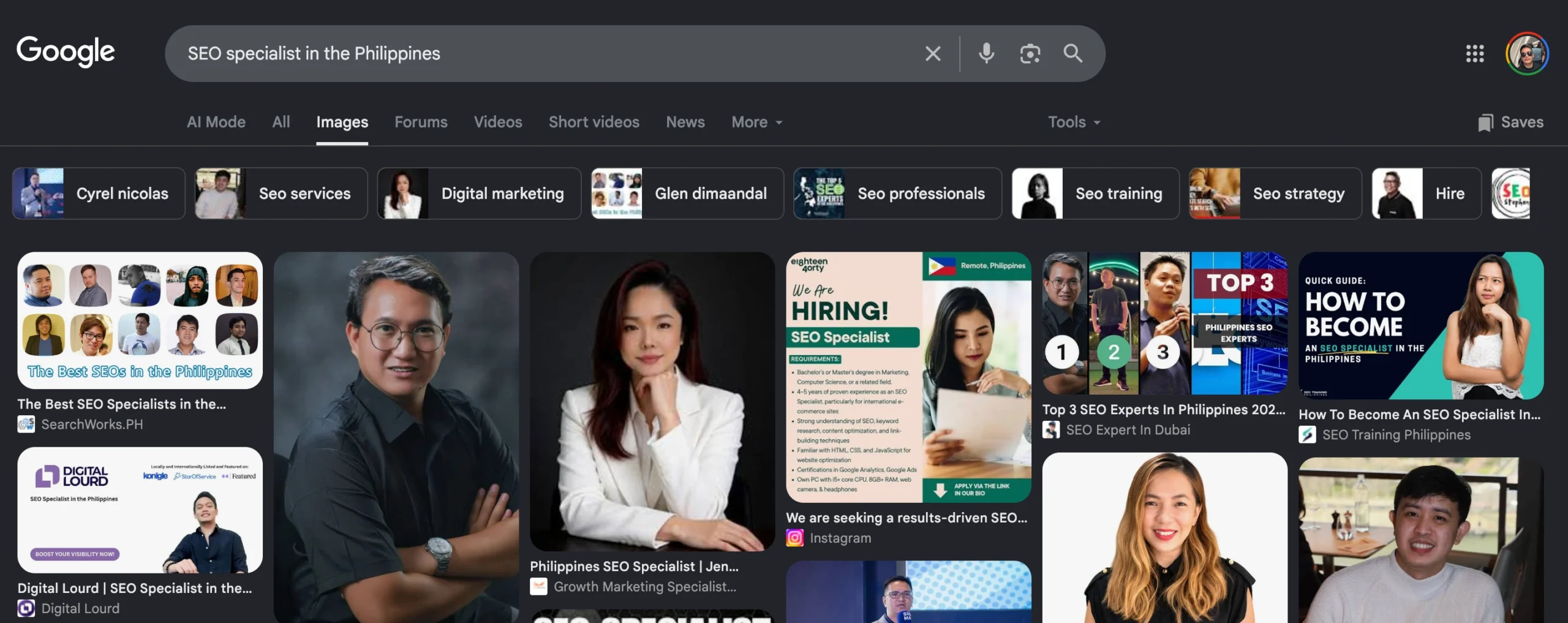
Image SEO involves making images on your site easy for search engines to find, index, and interpret. It combines technical adjustments with clear context so visuals support your content and appear in relevant search results. The aim is to boost visibility in Google Images and Google Discover while improving overall page relevance.
- Use descriptive, keyword-rich filenames and concise alt text that accurately describe image content for accessibility and SEO.
- Serve optimized formats and sizes: compress images, use WebP or AVIF, and balance quality with file size to improve load times.
- Implement responsive images with srcset and width/height attributes to prevent layout shifts and serve appropriate resolutions.
- Provide contextual captions, surrounding text, and image titles to help search engines understand relevance and user intent.
- Add images to an image sitemap or structured data, and ensure crawlable URLs and proper canonicalization for indexing.
Good image SEO touches every stage of a page, from file naming to how images are served. When done well, images contribute to faster load times, lower bounce rates, and stronger engagement signals that search algorithms reward.
- Introduction
- 1. Use Descriptive, SEO-Friendly Image Filenames
- 2. Write Accurate, Keyword-Rich Alt Text
- 3. Optimize Image Size and Quality
- 4. Implement Structured Data and Image Sitemaps
- 5. Ensure Responsive Images for All Devices
- 6. Contextualize Images with Relevant Surrounding Content
- 7. Leverage Captions, Titles, and Nearby Content
- FAQ
- Conclusion
Why image optimization matters for the Philippines-based digital marketing professional
For consultants in the Philippines, image optimization translates to more qualified traffic without increasing ad spend. Well-optimized images help your content surface in visual search features, supporting brand credibility and lead generation.
Key benefits include:
- Improved image indexing by search engines, expanding discovery across Google Images and related surfaces.
- Faster page loads through optimized file sizes, which supports better PageSpeed Insights scores.
- Stronger relevance signals when images align with on-page topics and user intent.
1. Use Descriptive, SEO-Friendly Image Filenames
Why filename matters
Filename signals the image context to search engines. Descriptive names help Google Images and Google Discover understand what the image represents, boosting indexing and relevance beyond alt text.
A clear filename also aids readers who encounter images in raw form, such as when saving or sharing content. It sets expectations for what the image will illustrate on the page.
Best practices for naming images
- Use concise, descriptive terms that reflect the image content and page topic
- Separate words with hyphens, not underscores or spaces
- Avoid generic names like img123.jpg; aim for specific phrases
- Include unique details when relevant, such as location or date if it enhances context
- Keep filenames aligned with surrounding page keywords to reinforce relevance
2. Write Accurate, Keyword-Rich Alt Text
Purpose of alt text
Alt text describes an image for users who cannot view it. It also helps search engines interpret the image context, contributing to indexing and relevance without relying on visible content alone.
How to craft effective alt text
Use precise, descriptive language that aligns with the page topic. Focus on the image’s main subject and its role within the content.
- Describe the main element clearly in under a short sentence
- Include a relevant keyword if it fits naturally
- Avoid stuffing or repeating terms already covered in the page copy
- Capitalize only normally and use punctuation to improve readability
3. Optimize Image Size and Quality
Compression techniques
Compression reduces file size while preserving perceived quality. Start with lossless methods for graphics with sharp edges and text, then use lossy where appropriate for photos. Test a few levels to balance detail with faster load times.
- Use progressive rendering for JPEGs to enhance perceived speed on slower connections
- Compress PNGs with indexed color when feasible to reduce size
- Apply WebP or AVIF formats where supported to achieve stronger size reductions
One of the best practices in Image SEO is converting JPEG, PNG, and other traditional image formats into the more efficient WebP format. WebP images are significantly smaller in file size while maintaining excellent image quality, helping improve page loading speed, Core Web Vitals, and overall SEO performance.
You can easily convert your images for free using Picflow's PNG to WebP Converter →
Choosing the right file format and dimensions
Format choice affects quality and decoding time. Match the format to the image type and its role on the page. Dimensions should align with how the image appears in layout to minimize unnecessary scaling.
- Photos: consider WebP or AVIF at web-friendly quality settings
- Graphics with text: PNG for crisp edges or SVG for scalable vector elements
- Thumbnails and icons: small dimensions with efficient compression
4. Implement Structured Data and Image Sitemaps
When to use image sitemaps
Image sitemaps help search engines discover images that might not be easily found through standard crawling. They are useful for sites with large image libraries, dynamic content, or images loaded via JavaScript. An image sitemap can improve indexing coverage across Google Images and related surfaces.
- Use when images are central to page topics or products
- Apply to sites with many images or images buried behind scripts
- Keep sitemap updates aligned with new or updated visuals
How to structure image metadata in sitemaps
Image metadata in sitemaps should clearly describe each image and its relationship to the page. Include essential fields that aid indexing without overloading the sitemap with redundant data.
- Include the image URL, caption, title, and license information where applicable
- Match image entries to their corresponding page URLs to establish context
- Maintain accurate image alternate text in your page content to reinforce semantics
| Element | Purpose | Best Practice |
|---|---|---|
| image | URL of the image | Provide direct, accessible paths |
| caption | Describes the image content | Keep concise and relevant to the page |
| title | Short descriptive title | Use keywords naturally |
| license | Usage rights | Specify license if applicable |
5. Ensure Responsive Images for All Devices
Using srcset and sizes
Responsive images adapt to device capabilities and viewport sizes. The srcset attribute lets the browser choose the most appropriate image variant. Pair it with the sizes attribute to guide rendering across breakpoints.
- Provide multiple image candidates tailored to common display widths
- Use modern formats that balance quality and file size
- Test across devices to confirm crisp rendering
Fallback considerations
Not all browsers support srcset and sizes. Include a plain src attribute as a fallback. Ensure the default image remains suitable for the smallest viewport to avoid layout shifts.
- Always include a basic image as the last resort
- Keep fallback images lightweight to preserve performance
- Validate rendering in older browsers during QA
6. Contextualize Images with Relevant Surrounding Content
Descriptive surrounding text
Surrounding text serves as a semantic signal for search engines. Place concise, descriptive phrases near the image to reinforce its meaning. This helps align the image with the page topic and user intent.
Keep captions brief and informative, and ensure nearby paragraphs explain how the image relates to the main argument. This alignment supports comprehension for readers and crawlers alike.
- Introduce the image with a sentence that mirrors its purpose
- Use nearby bullets or a short paragraph to summarize the image content
- Avoid repeating the same information in the alt text and surrounding text
Image relevancy to page topic
Images should directly support the page topic rather than serve as decorative filler. Relevance signals help search engines understand the page context and improve indexing for visual features.
Assess each image for alignment with the core message, data points, or examples on the page. If an image illustrates a concept, pair it with a brief explanation that connects visuals to the written content.
- Ensure the image topic mirrors the page's keywords and intent
- Avoid off-topic graphics that dilute the page focus
- Update imagery when page topics shift to maintain alignment
7. Leverage Captions, Titles, and Nearby Content
Benefits of captions
Captions provide immediate context for readers and search engines. They link the visual to the page topic without forcing extra clicks. Use captions to summarize the image’s relevance and tie it to key points on the page.
- Improve comprehension by clarifying purpose
- Enhance accessibility for screen readers
- Boost engagement by inviting viewers to connect visuals with content
Using image titles effectively
Image titles should be concise and descriptive. They support users browsing with keyboards and assistive tech, and they help search engines understand image intent. Integrate natural keywords without keyword stuffing.
- Keep titles under a couple of words when possible
- Reflect the image role in the surrounding text
- Avoid duplicating alt text; use complementary phrasing
Nearby content strategy
Position nearby content to reinforce the image meaning. Short explanatory sentences near the image contextually anchor the visuals to the topic. Surrounding paragraphs and bullet lists should echo the image’s message.
- Place a sentence before or after the image that previews its takeaway
- Use nearby bullets to summarize the image’s data or example
- Ensure consistency between image narrative and on-page keywords
FAQ
Below are concise answers to common questions about image SEO. Each response stays grounded in best practices and the material provided.
What is image SEO?
How do I choose the right image for a page?
Why use descriptive file names?
What should alt text convey?
How can I ensure images load quickly?
When should I add an image sitemap?
What role do captions play?
How do I handle images on mobile?
Conclusion
Image SEO is an ongoing practice that should feel like a natural part of your page experience. When images support the surrounding content, they improve how your pages perform in visual search and contribute to topical relevance.
At lordvincentvanmendoza.com, the emphasis remains on practical, repeatable steps that fit real-world workflows. Align image assets with page intent, structure data to aid discoverability, and keep visuals fast and responsive across devices.
- Highlight descriptive, keyword-informed image naming alongside accurate alt text.
- Balance image quality with file size to maintain user experience and crawl efficiency.
- Leverage image sitemaps and structured data to improve indexing and surface visibility.
Consistency matters. Regularly review how images fit the page topic, update visuals when content shifts, and verify performance with essential tooling. The aim is steady, measurable improvements in how visuals support your pages and brand credibility.
References

Vince is a digital marketing specialist, event host, and content creator based in Davao City, Philippines. Known for blending creativity, communication, and strategy, he helps brands and organizations strengthen their digital presence through compelling content and smart marketing practices. He specializes in SEO, content creation, social media management, pay-per-click advertising, and email marketing—turning ideas into content that builds visibility and helps businesses grow online. Outside of work, he loves to watch Netflix on weekends.